Skip to content
📇 Contacts & CRM

Built-in ContactManagement

A powerful contact database built right into your phone system. Store, organize, search, and call your contacts — without switching between apps.

Who is calling, before you answer

Contacts, groups and tags — the same list your campaigns target.

app.talkify.com.bd
Contacts — customers grouped into merchants, corporate clients and riders, with company, number and tags.
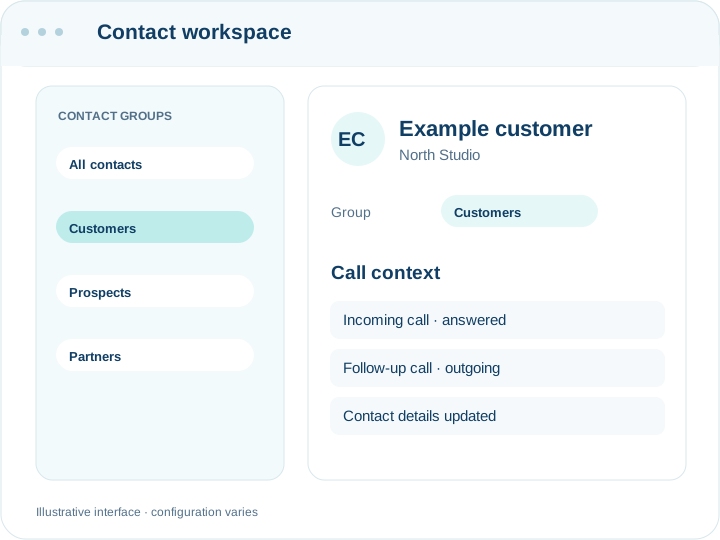
Contacts grouped by how you actually work with them

One list, used by everything

Contacts are not a separate address book. The same list names your inbound callers, targets your campaigns and fills your call reports.

Who is calling, before you pick up

An inbound call from a number in your contacts shows the name and company rather than eleven digits — in the softphone, in the call log and in the history a colleague looks at afterwards. That is the whole return on keeping the list current.

Groups are how you target

Put contacts into groups that match how you actually work with them — merchants, contract accounts, delivery riders — and campaigns target a group rather than a spreadsheet you exported last month. Tags add a second dimension when a group is too blunt.

Getting your list in

Import from CSV with the columns you already have. Contacts carry name, company, phone, email, address, notes and tags, so most existing lists come across without being restructured first.

The list decays, and that is the real problem

No import keeps itself accurate. Numbers change, businesses close, and a campaign to a year-old list produces a failure rate that looks like a platform fault. Contacts can be edited from the call log as you go, which is the only maintenance habit that survives contact with a busy week.

Importing twice does not double your list

The importer matches on the last ten digits of the number, so +8801712345678, 8801712345678 and 01712345678 are recognised as the same person however your source file wrote them. Rows that match an existing contact are skipped rather than duplicated, and the import reports how many were created and how many skipped — which is also the quickest way to find out how much overlap two lists really had.

Where the list is used

The same contacts name your inbound callers in the softphone and the call log, target your broadcast and survey campaigns, and appear in the directory your team searches. There is no separate marketing list to keep in step, which is the usual reason one of them ends up a year out of date.

Unlimited
Contacts per tenant
< 50ms
Search response time
100K+
CSV import capacity
100%
Call history linked

Everything You Need to Manage Contacts

No more spreadsheets or separate CRM subscriptions. Talkify gives you a built-in contact manager that's designed for voice-first teams.

Contact Database

Store unlimited contacts with full profile fields — name, phone numbers, email, company, notes, and custom fields. Your single source of truth for every customer interaction.

  • Unlimited contacts
  • Custom fields
  • Full profile data

Groups & Tags

Organize contacts into groups for targeted campaigns and broadcasts. Apply tags for instant filtering and build dynamic segments based on any criteria.

  • Tag-based filtering
  • Campaign groups
  • Dynamic segments

CSV Import / Export

Bulk import thousands of contacts with intelligent field mapping. Export your entire database anytime for backup, migration, or compliance purposes.

  • Bulk import
  • Field mapping
  • Backup export

Call History Link

Every contact card shows complete call history — inbound, outbound, missed. Access recordings, transcriptions, and agent notes directly from the contact profile.

  • Full call history
  • Recording access
  • Agent notes

Smart Search

Search across all fields instantly with fuzzy matching. Find contacts by name, phone number, email, company, tag, or any custom field in milliseconds.

  • All-field search
  • Fuzzy matching
  • Instant results

Click-to-Call

Initiate calls with a single click from any contact card. Automatic caller ID matching ensures the right number is displayed to your customers every time.

  • One-click calling
  • Auto caller ID
  • Contact card dialing

Your Phone System + CRM, Finally Unified

Common questions

How many contacts can I store?

There is no per-contact charge and no practical cap on the address book. Campaign sizes are governed by your plan.

Can I import from Excel?

Save as CSV and import. Map your columns during the import; you do not have to rename headers first.

Do contacts sync with my CRM?

Not automatically. The API reads and writes contacts, so a sync is straightforward to build, and webhooks can push call events into your own system.

What happens to a contact on the do-not-call list?

They stay in your contacts and are skipped by campaigns, recorded as skipped rather than silently dropped. You can still call them by hand if there is a reason to.

Can different teams have different lists?

Groups separate them within one account. Permissions are by role rather than by group, so a sales agent sees the whole address book — worth knowing if your lists are sensitive to each other.

What if the same person has two numbers?

Add them as two contacts, or keep the second in the notes. The importer treats different numbers as different people, which is deliberate — merging on name would be wrong far more often than it would be right.

Can I bulk-delete a group?

Contacts are deleted individually or by re-importing a corrected list. Deleting a group leaves its contacts in place and ungrouped rather than removing them, so an accidental click does not take the list with it.

Stop Juggling Tools

Manage every contact, call, and conversation from a single platform. Try Talkify's built-in contact management today.

Contact Management | Built-in CRM | Talkify