Skip to content
🎯 IVR Builder

Visual IVR BuilderDesign Call Flows Visually

Build professional multi-level IVR menus with a drag-and-drop canvas. Map DTMF keys to 10+ destination types, add TTS or uploaded prompts per key, and integrate time-based routing — all without writing a single line of code.

Draw the call flow, then it is live

Every key press points somewhere real — a queue, a ring group, an extension, or the AI agent.

app.talkify.com.bd
The visual IVR flow builder: a Bengali greeting node branching to six destinations — three call queues, a ring group, the AI voice agent and an extension — each marked as configured.
Visual flow builder — six branches, each wired to a live destination

Menus that stay understandable

Every IVR starts simple and grows into something nobody can hold in their head. The builder is a canvas rather than a form because the shape of a call flow is the thing you need to see.

You draw it, and that is the live configuration

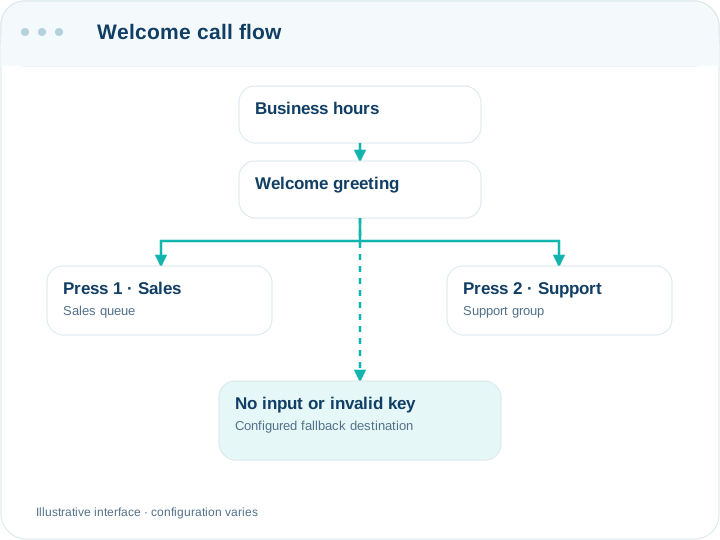
Each key on the phone becomes a node pointing at a real destination — a queue, a ring group, an extension, a sub-menu or an AI agent. There is no separate deployment step and no second representation to keep in sync: the diagram is the configuration. Branches you have not finished wiring are flagged, so a menu that would drop callers into silence tells you before a caller does.

Greetings in Bangla, spoken or recorded

Type the greeting and the platform speaks it in one of two Bangladeshi Bengali voices, or upload a recording of a real person. Text is faster to change — useful for anything seasonal, like a holiday schedule — while a recorded human voice still sounds better for the line customers hear most often.

What happens when nobody presses anything

Most callers listening to a menu are doing something else. Every menu has an explicit timeout destination and an invalid-input destination, and both default to sending the caller to a queue rather than hanging up. The number of retries before that happens is yours to set.

Nested menus, used sparingly

Sub-menus nest several levels deep, which is enough rope to build something unusable. The canvas helps here: a tree that is painful to look at is painful to listen to, and depth is easier to justify on screen than it is on a phone.

Building IVR Menus Shouldn't Require Engineering

XML & Config Files

Traditional IVR systems require hand-written dialplan XML, proprietary scripting languages, and CLI-only configuration.

Poor Caller Experience

Static, flat menus with no time-awareness leave callers navigating irrelevant options after hours or on holidays.

Rigid Routing

Legacy systems limit destinations to extensions only. No support for queues, AI agents, ring groups, or dynamic routing.

6 Powerful IVR Capabilities

Everything you need to craft world-class caller experiences.

Drag-and-Drop Designer

Build entire call flows visually — no coding, no scripting, no XML. Simply drag menu nodes, connect destinations, and publish instantly.

Multi-Level Menus

Create sub-menus within menus for complex navigation trees. Callers can drill down through departments, services, and self-service options.

DTMF Key Routing

Map each key (0-9, *, #) to any destination — extensions, queues, ring groups, voicemail boxes, external numbers, or AI agents.

Per-Key Audio Prompts

Upload custom audio files or use AI-powered Text-to-Speech to generate professional prompts. Preview audio before publishing.

Time-Based Routing

Integrate with business hours schedules. Route callers to different menus during open hours, after hours, weekends, and holidays.

10+ Destination Types

Route to extensions, ring groups, queues, voicemail, external numbers, conference bridges, other IVRs, AI voice agents, hangup, or callback.

Launch in 4 Steps

From blank canvas to live call flow in under 10 minutes.

01

Create IVR

Name your IVR, set a greeting prompt, and choose your root menu language.

02

Design Flow

Drag menu nodes onto the canvas. Map DTMF keys to destinations with the visual editor.

03

Add Audio

Upload WAV/MP3 recordings or type text to generate TTS prompts per key and per menu.

04

Assign DID

Attach the IVR to any inbound DID number so callers hear your flow immediately.

Technical Specifications

Menu DepthUnlimited nested levels
DTMF Keys0-9, *, # (12 keys per menu)
Audio FormatsWAV, MP3, OGG
TTS EngineAI Text-to-Speech (30+ voices)
Destination Types10+ (Extension, Queue, Ring Group, Voicemail, External, AI Agent, etc.)
Time RoutingBusiness hours, holidays, timezone-aware
Timeout ActionConfigurable — replay, redirect, or hangup
Live UpdatesPublish changes without call interruption

Practical questions

Can I change the menu during business hours?

Yes. Edits apply to the next call, not the next restart, so you can move a branch at eleven in the morning without dropping anyone already listening.

Can different numbers have different menus?

Yes — each number points at its own destination. A support line and a sales line can run entirely separate flows, or share one menu that branches by key.

What if a caller has a rotary phone or DTMF fails?

The timeout path catches them: after the retries you have set, the call goes wherever you pointed the timeout, normally a human queue. Always leave that as a person, not voicemail, for your main line.

Can an IVR branch reach the AI agent?

Yes. One key can send the caller to a voice agent while the others go to queues — a common arrangement is to let the AI handle the enquiry everyone makes and route the rest to people.

Is there a limit on menus?

Not a practical one. Menus, ring groups and queues are unlimited; the limits that bite are extensions and concurrent calls, which come from your plan.

Ready to Build Your First IVR?

Go from blank canvas to professional call flow in minutes. No code, no consultants, no limits.

IVR Builder | Visual Call Flow Designer | Talkify